Every screen here is captured from the Hesovia prototype as it runs, on invented data. Hesovia is in development; the walkthrough shows the same screens live.
Seven screens. Two roles. The demo you will be shown.
These are the screens of the working prototype, in the order a walkthrough takes them, on invented data. The names, people and figures are the ones you will see on the call.
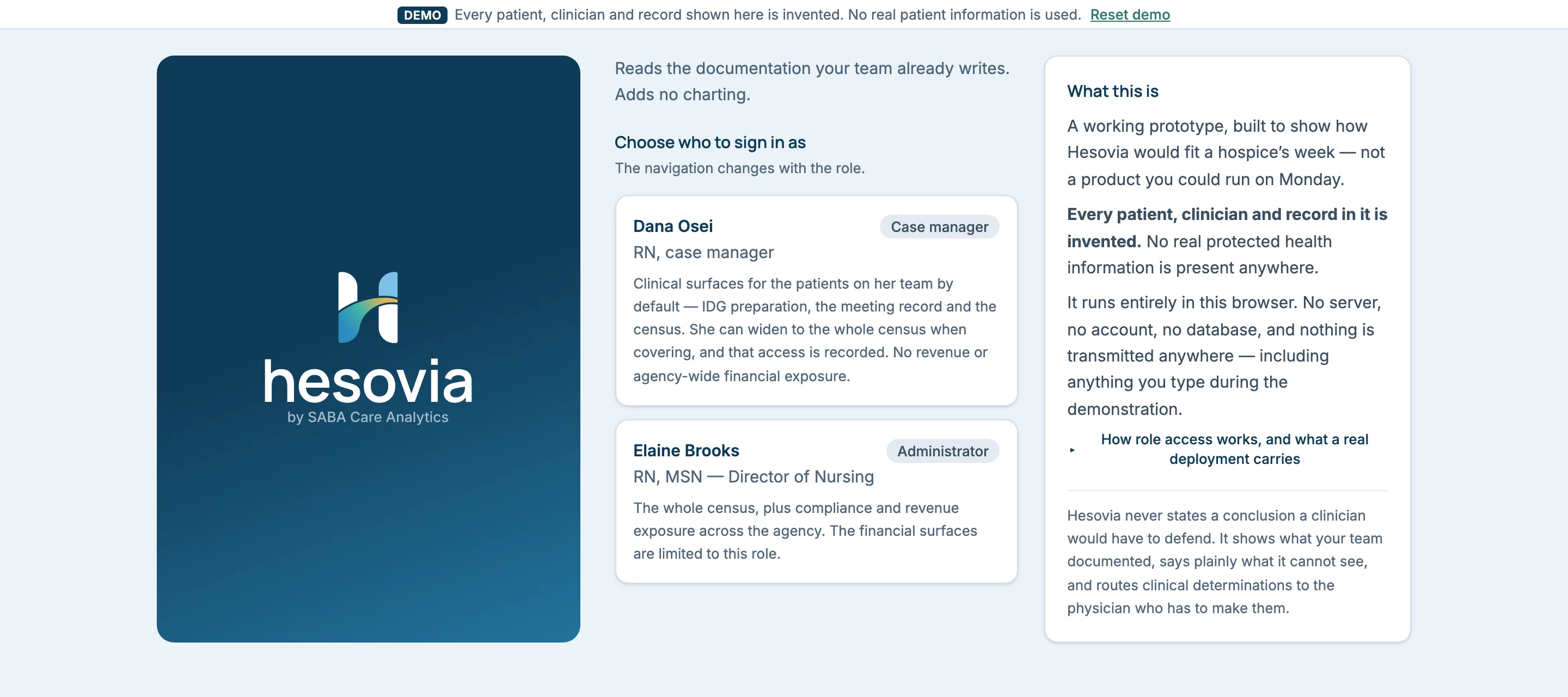
Dana OseiCase manager
RN, case manager · Team 2 — North County, 25 patients
Clinical surfaces for the patients on her team by default — IDG preparation, the meeting record and the census. She can widen to the whole census when covering, and that access is recorded. No revenue or agency-wide financial exposure.
Elaine BrooksAdministrator
RN, MSN — Director of Nursing · all 64 patients
The whole census, plus compliance and revenue exposure across the agency. The financial surfaces are limited to this role.
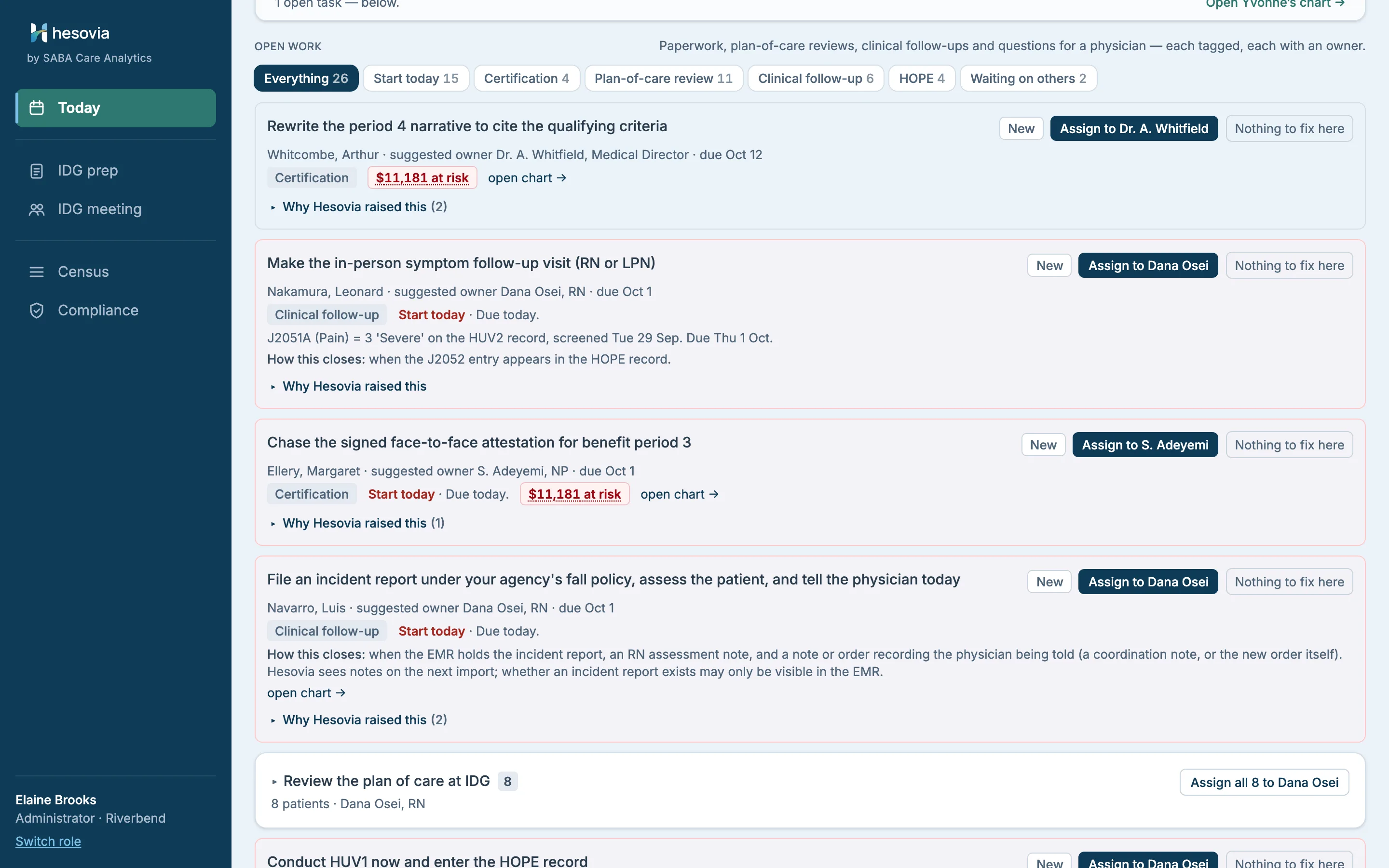
The navigation changes with the role. Dana’s sidebar has four entries; Elaine’s has five, and she lands on Compliance. Switch role keeps what the other role just did, and Reset demo clears it.
Sign inStep 1 · one minute
Who sees what, and where the data goes, before anything else.
Sign-in answers the two questions every clinical buyer asks first. Choose a role: a case manager scoped to her team, or an administrator who sees the agency. The panel beside it states what the demo is and is not.
The demo runs in the browser on invented data. Nothing you type into it is sent to us or stored on a server.
Open full size ↗Invented dataSign in. Two roles; the navigation changes with each.TodayWhat must I do this morning
Patients first, then the work, ranked by consequence and deadline.
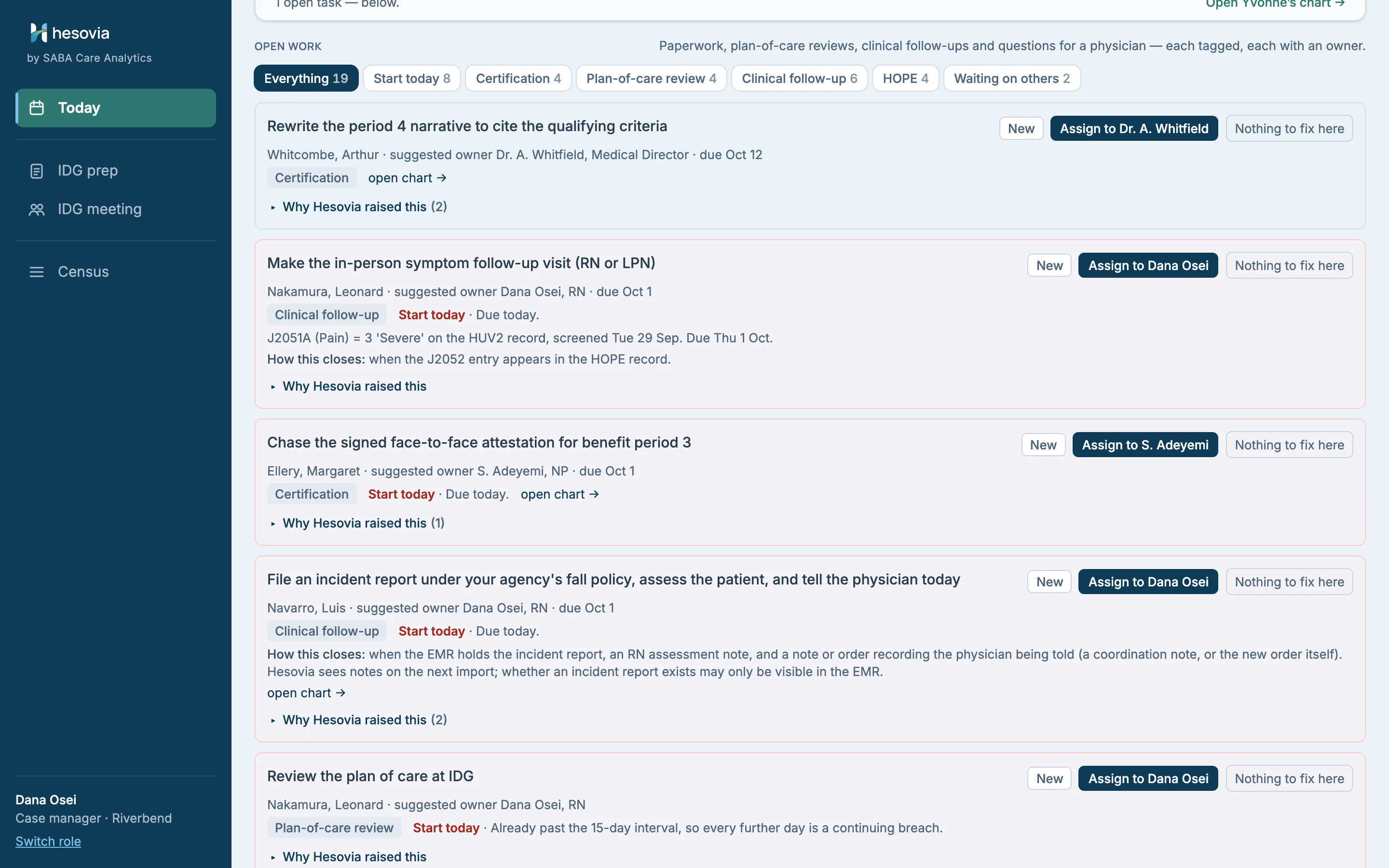
Today opens on the patients whose charts changed: Changed since your last visit, declining first, each change attributed to the discipline that wrote it. Below it, Open work: paperwork, plan-of-care reviews, clinical follow-ups and questions for a physician, each an instruction to a named person, with a deadline where there is one.
New
→With someone
→Picked up
→Done
→Confirmed
orNothing to fix
Hesovia marks an item Confirmed only where it can see the fix in the next import. Everything else stops at Done, for a person to confirm in the EMR.
Nothing to fix here is a first-class outcome. A tool with nowhere to record a false positive trains people to ignore it.
Filters for Start today and Waiting on others; Closed (0) holds what is finished; the heading says how fresh the data is: Record current as of Thu 6:10 AM.
On the chart and on Compliance, a task shows its state and owner: Open · Dr. A. Whitfield, Medical Director, or Chasing · S. Adeyemi, NP once someone is pursuing it.
Dismissing one finding is a click, with a reason if you have one. Stopping Hesovia reporting that kind of finding again takes a stated reason, and a real deployment routes it to a second person to approve.
Why Hesovia raised this opens the source notes, verbatim and attributed: an instruction you can act on, and the evidence one click beneath it.
Every clinical task says How this closes: the EMR record Hesovia will see on the next import.
Open full size ↗Invented dataOpen work on Dana’s Today: each row tagged and owned, dated where there is a deadline.
Open full size ↗Invented dataThe administrator’s Today. Eight identical plan-of-care reviews fold into one row with Assign all 8 to Dana Osei.Open full size ↗Invented dataIDG prep, one click away: the same patients, assembled for the meeting.
See it on a call, with the questions your agency would ask.
Three disciplines, three observations, assembled before the meeting.
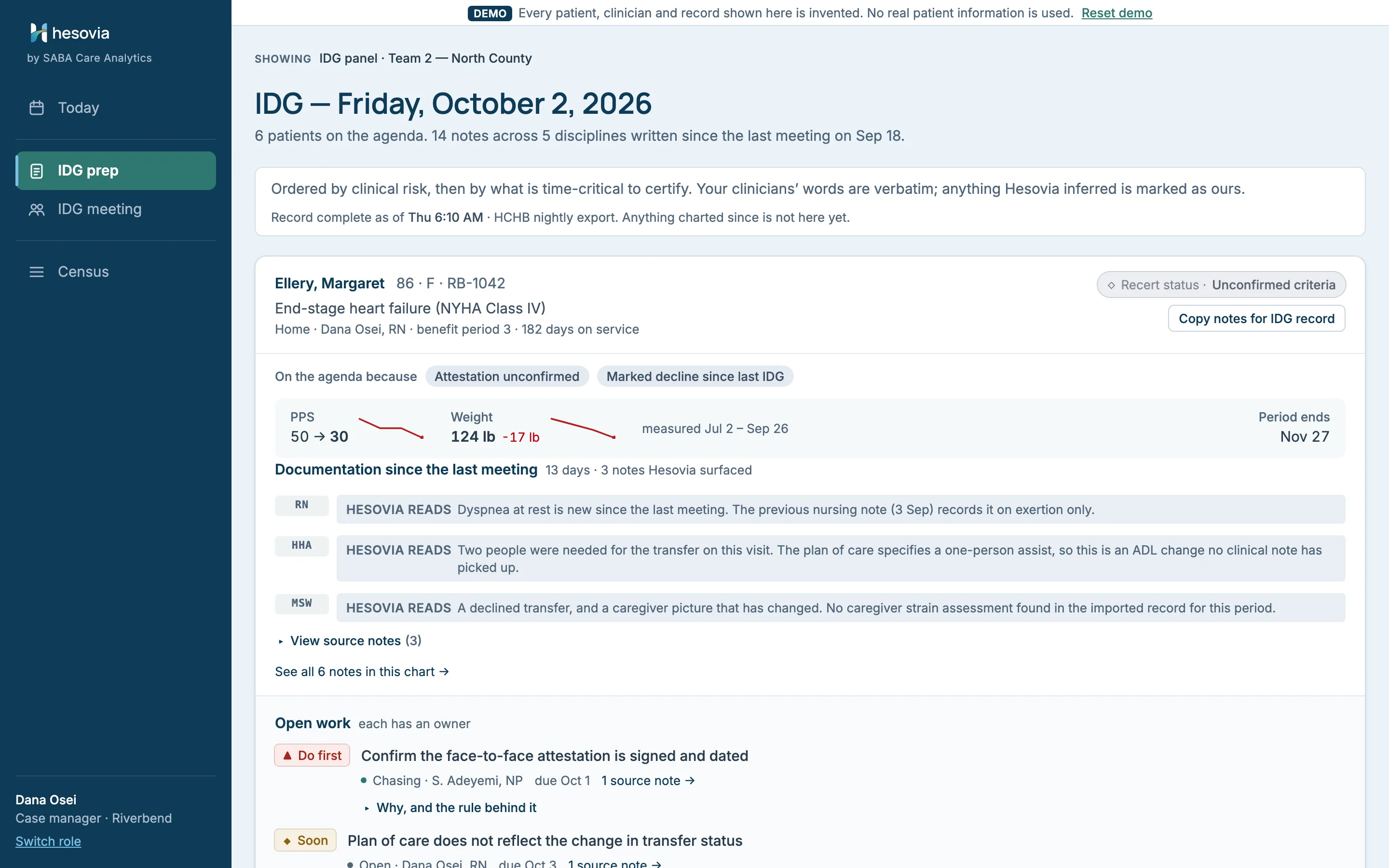
For each patient on the agenda, IDG prep puts what every discipline documented since the last meeting in one panel, ordered by clinical risk and then by what is time-critical to certify.
Each line you scan is Hesovia’s reading, labelled Hesovia reads and attributed to the discipline. View source notes opens what your clinicians wrote, in full.
Ellery, Margaret: the nurse recorded dyspnea at rest; the aide documented a two-person transfer where the plan of care still says one-person assist; the social worker recorded a declined ED transfer and a caregiver picture that has changed.
Navarro, Luis: an aide recorded a slip, and six days later a nurse recorded new numbness and weakness in his left hand. Two notes, two authors, and nothing in the chart connects them. Hesovia does not join them for you, and it does not call a slip a fall: which events are reportable is your agency’s definition.
Copy notes for IDG record hands the notes and open items over as text for your EMR. Open a chart from a panel and its breadcrumb brings you back to the same panel.
Hesovia readsDyspnea at rest is new since the last meeting. The previous nursing note (3 Sep) records it on exertion only.Patient chartSummary · Hospice criteria
One screen for the meeting. The whole evidence when someone asks.
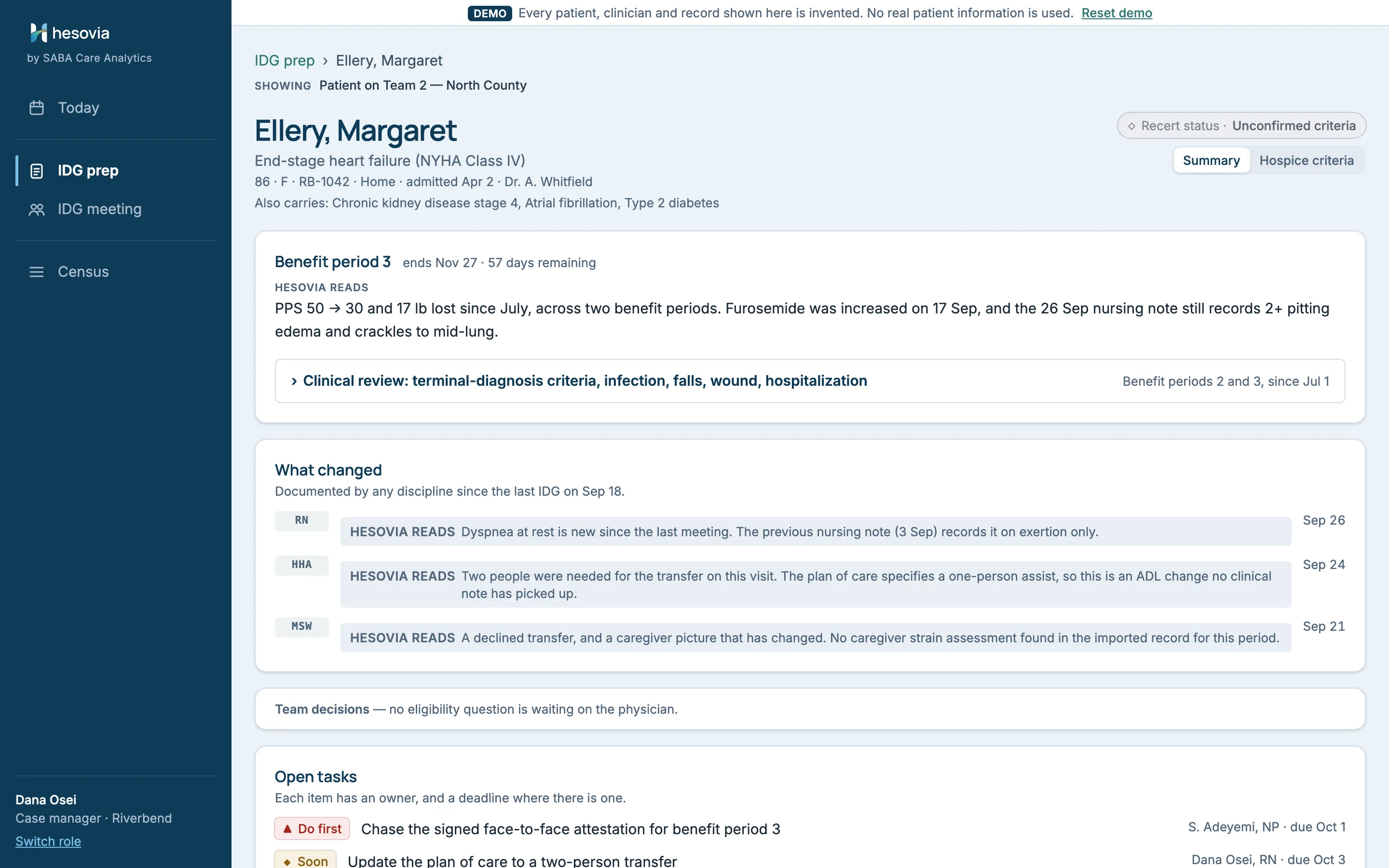
A chart opens in Summary: what changed since the last IDG, team decisions waiting on the physician, and open tasks, each with an owner. Hospice criteria is the long view: every note, every measure, every provenance line. The summary is a filter over that page, not a summary written on top of it.
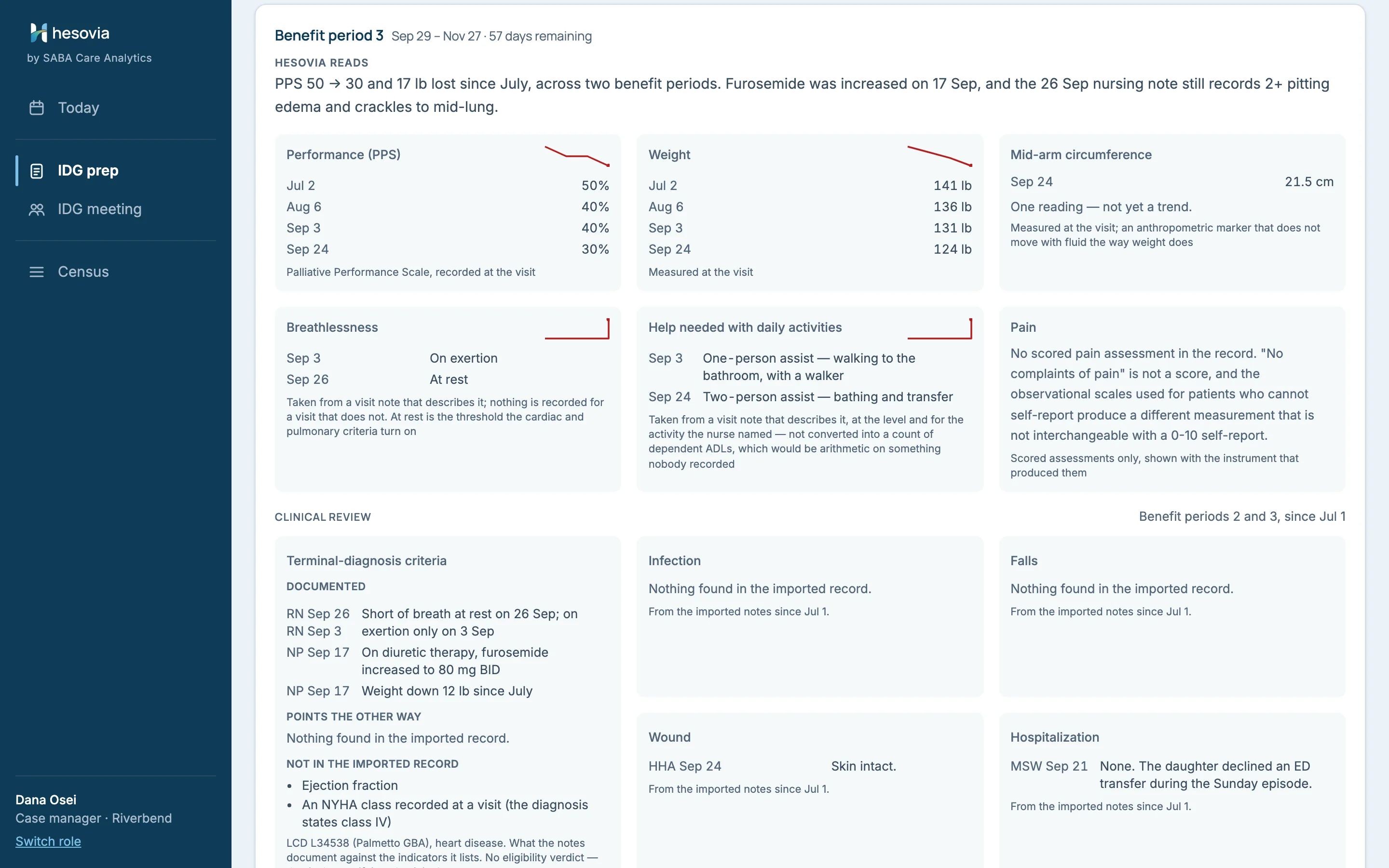
Open full size ↗Invented dataSummary for Margaret Ellery, with Clinical review: terminal-diagnosis criteria, infection, falls, wound, hospitalization.
Measures, charted the same way: performance, weight, mid-arm circumference, breathlessness, help needed with daily activities and pain. Ellery’s breathlessness moves from on exertion to at rest, in her own nurses’ words: a finding the heart-disease criteria look for.
Empty on purpose: an unrecorded measure says what Hesovia would need to see rather than disappearing. A pain score renders with its instrument, or not at all.
The Hospice criteria view also carries Medications this period and Documentation, newest first: every imported note, verbatim.
Clinical review shows what the applicable hospice LCD lists that is documented (LCDs are set by each Medicare Administrative Contractor; the demo uses its agency’s), what points the other way and what is missing, and never adds it up to a verdict.
Stated against observed: Ellery’s diagnosis states NYHA Class IV, no visit note records a class, and Hesovia sets the stated class beside the breathlessness the notes do describe.
Open tasks with names and dates:Chase the signed face-to-face attestation for benefit period 3 goes to the NP who owes it, with a due date.
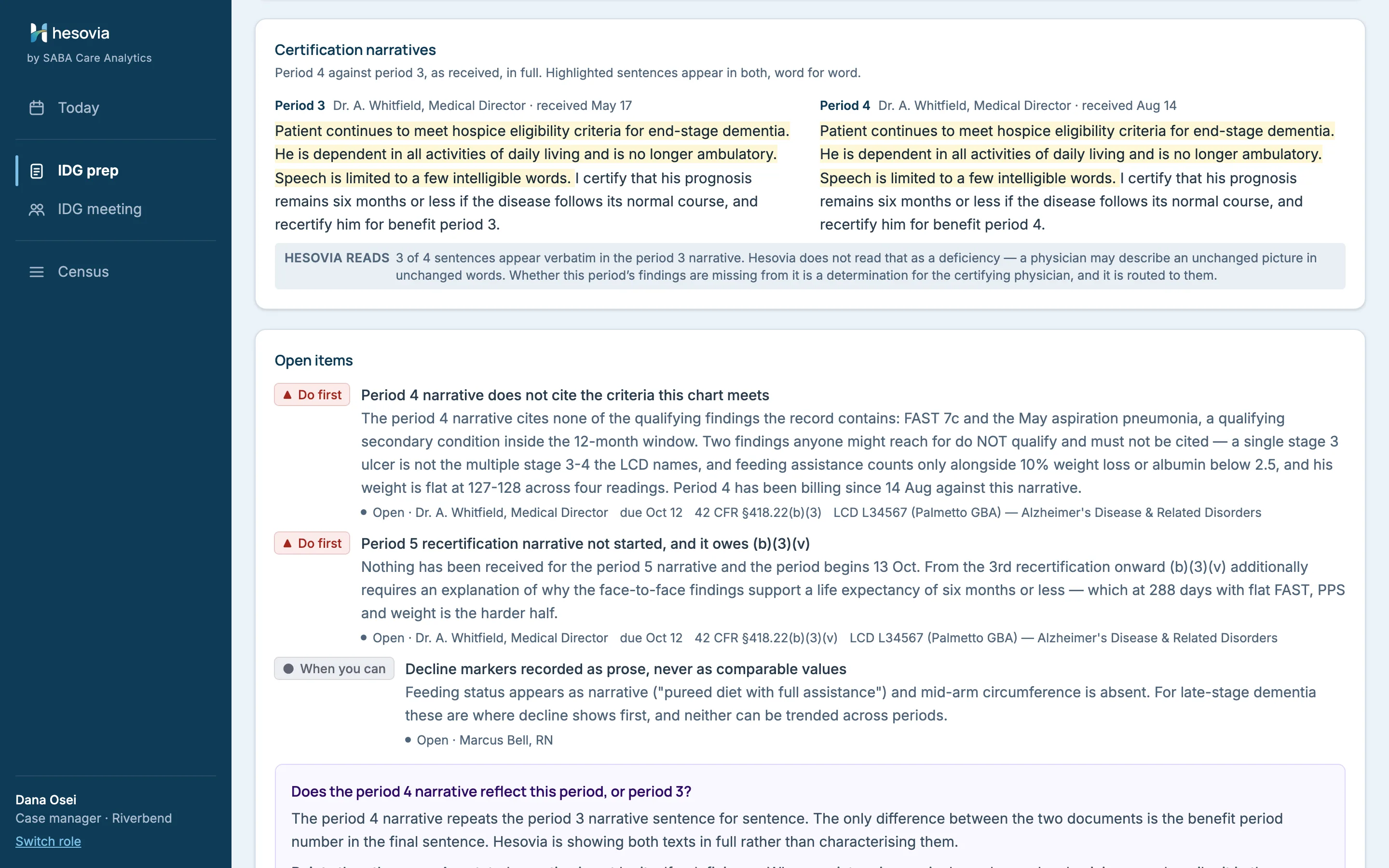
Open full size ↗Invented dataHospice criteria: measures and clinical review. No eligibility verdict — that is the certifying physician's.Open full size ↗Invented dataCertification narratives for Arthur Whitcombe, in full, side by side. Hesovia does not read that as a deficiency; the question goes to the physician.
IDG meetingThe deliverable
Prep that stops at the meeting door is a report. This records the meeting.
Every patient on the team is reviewed, not only the six with changes, because the group’s documented review of each plan of care is what keeps its 15-day interval.
1. Attendance
→2. Review
→3. Verify
Attendance starts empty and is recorded by role, so the minutes show which members of the interdisciplinary group took part.
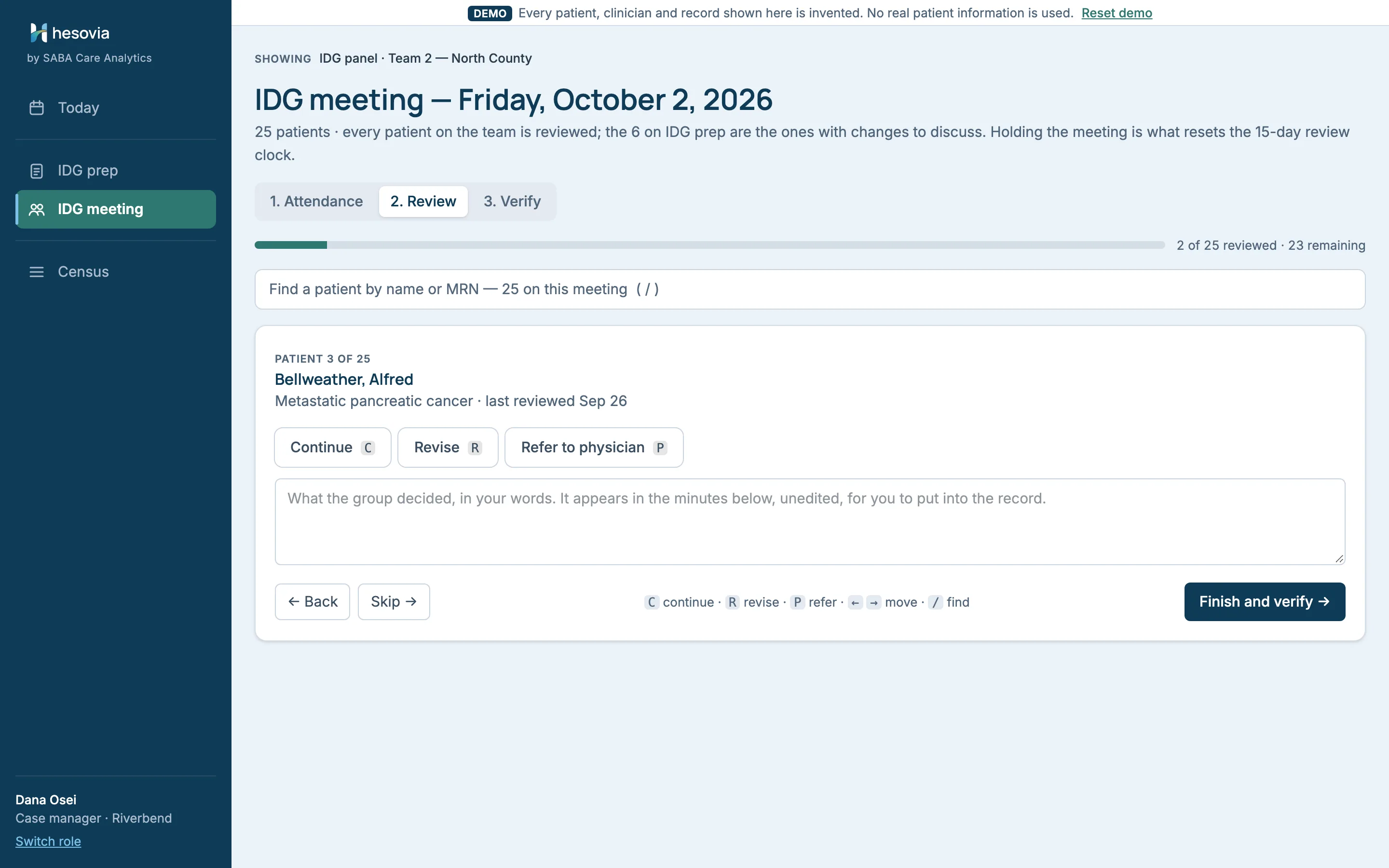
Review runs from the keyboard: C continue, R revise, P refer to the physician, / to find a patient. Whoever is recording keeps pace with the discussion, not the other way round. What the group decided goes in, in your words.
Verify checks that attendance is recorded and how many plans were left unreviewed before the minutes are exported. A decision taken before attendance is complete is stamped in the minutes; the minutes stay on screen to copy by hand.
The minutes carry your group’s words and Hesovia’s structure, each labelled. Hesovia composes no clinical narrative and makes no prognosis determination.
Open full size ↗Invented dataIDG meeting, Review phase: Continue, Revise or Refer to physician, one key each.CensusHighest confidence: arithmetic on two dates
The plan-of-care interval, checked from dates alone, for every patient on the census.
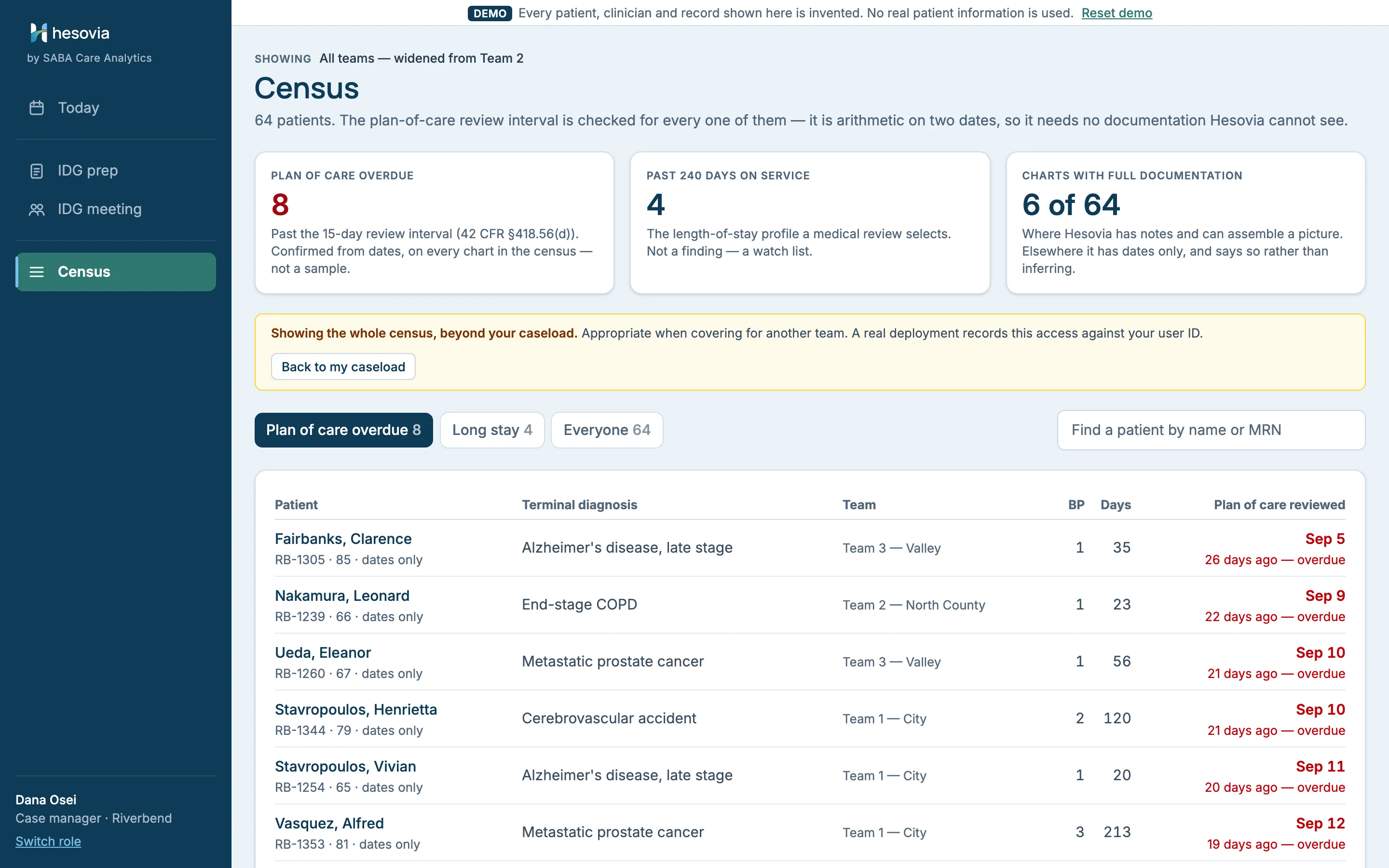
Every plan of care must be reviewed at least every 15 calendar days. That is arithmetic on two dates, so Hesovia checks it for the whole census.
The plan-of-care review interval is checked for every one of them — it is arithmetic on two dates, so it needs no documentation Hesovia cannot see.Census
Dana opens on her own caseload: 25 patients. Every screen states its population on the line above its title.
Show the whole census widens her view to all 64 when she covers an on-call, and Back to my caseload returns her to her 25. Widening is permitted rather than blocked, because blocking a covering nurse would be a care problem, and an amber banner says the view is beyond her caseload.
A long-stay watch list sits beside the overdue count. Not a finding — a watch list. Tabs for overdue, long stay and everyone, and a search by name or MRN.
Open full size ↗Invented dataCensus, widened from Team 2 to all teams. Showing the whole census, beyond your caseload.ComplianceThe owner’s win · administrator only
Where documentation is incomplete, and how much of it Hesovia cannot settle.
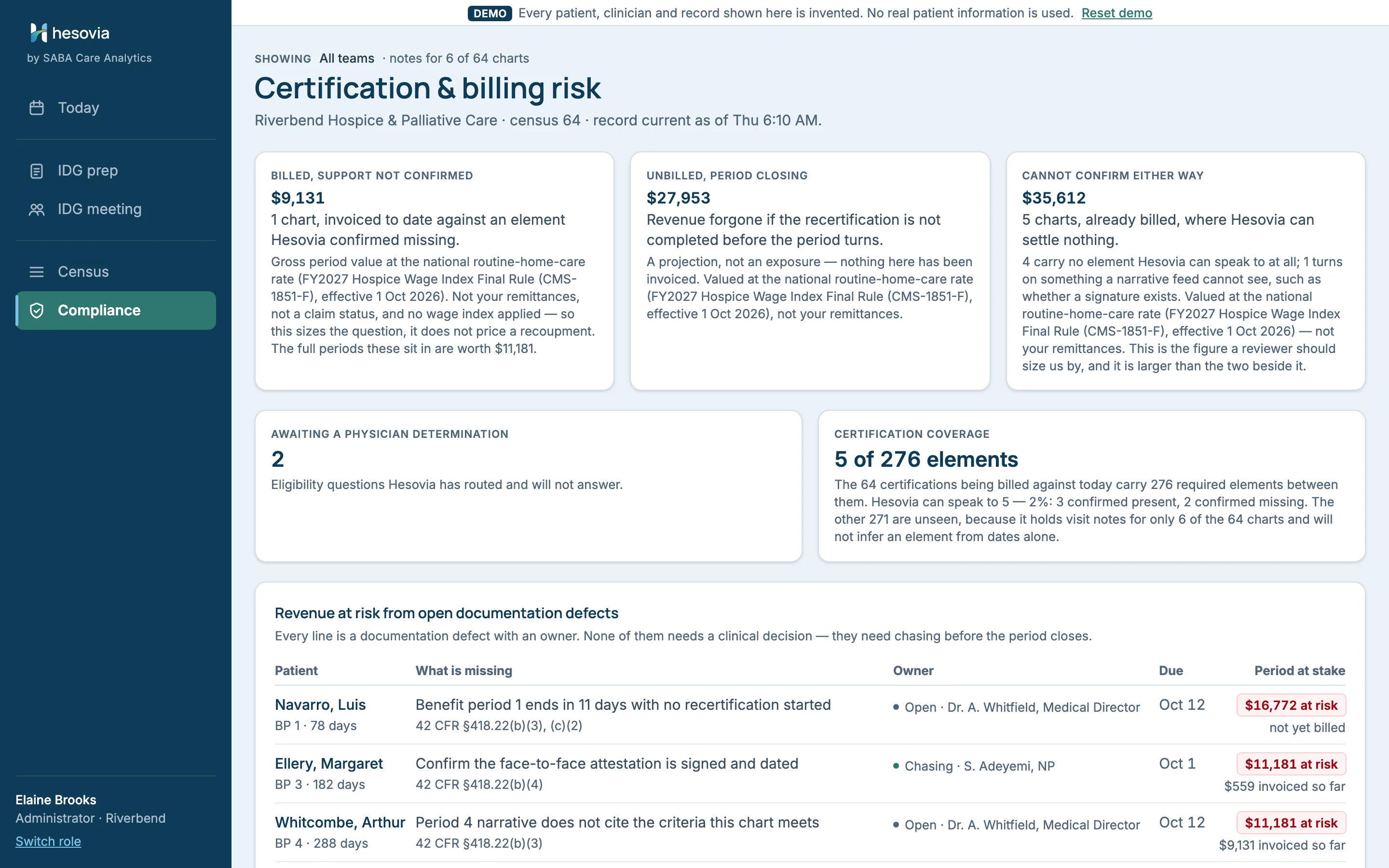
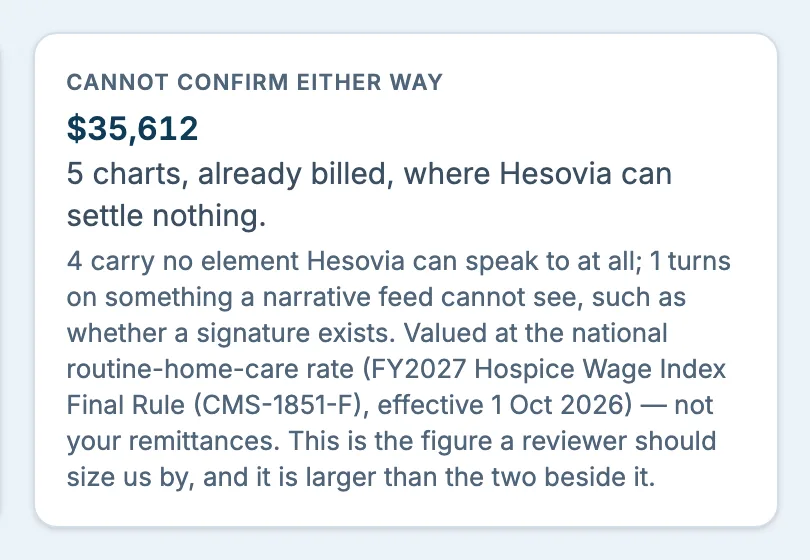
The administrator lands on this screen, Certification & billing risk. Its headline cards size the questions: periods already invoiced where a required element is confirmed missing, and the charts Hesovia cannot confirm either way, which is the largest figure on the screen.
Certification coverage says how much of the record Hesovia can actually speak to, with the rest counted as unseen rather than left out.
Open documentation items are listed by owner and due date, and a recertification pipeline lists the six certification elements for every period; the coverage card counts the ones Hesovia cannot see. Certification itself is the physician’s determination.
Lower on the screen: What Hesovia cannot confirm, and what it carries, and Longest stays.
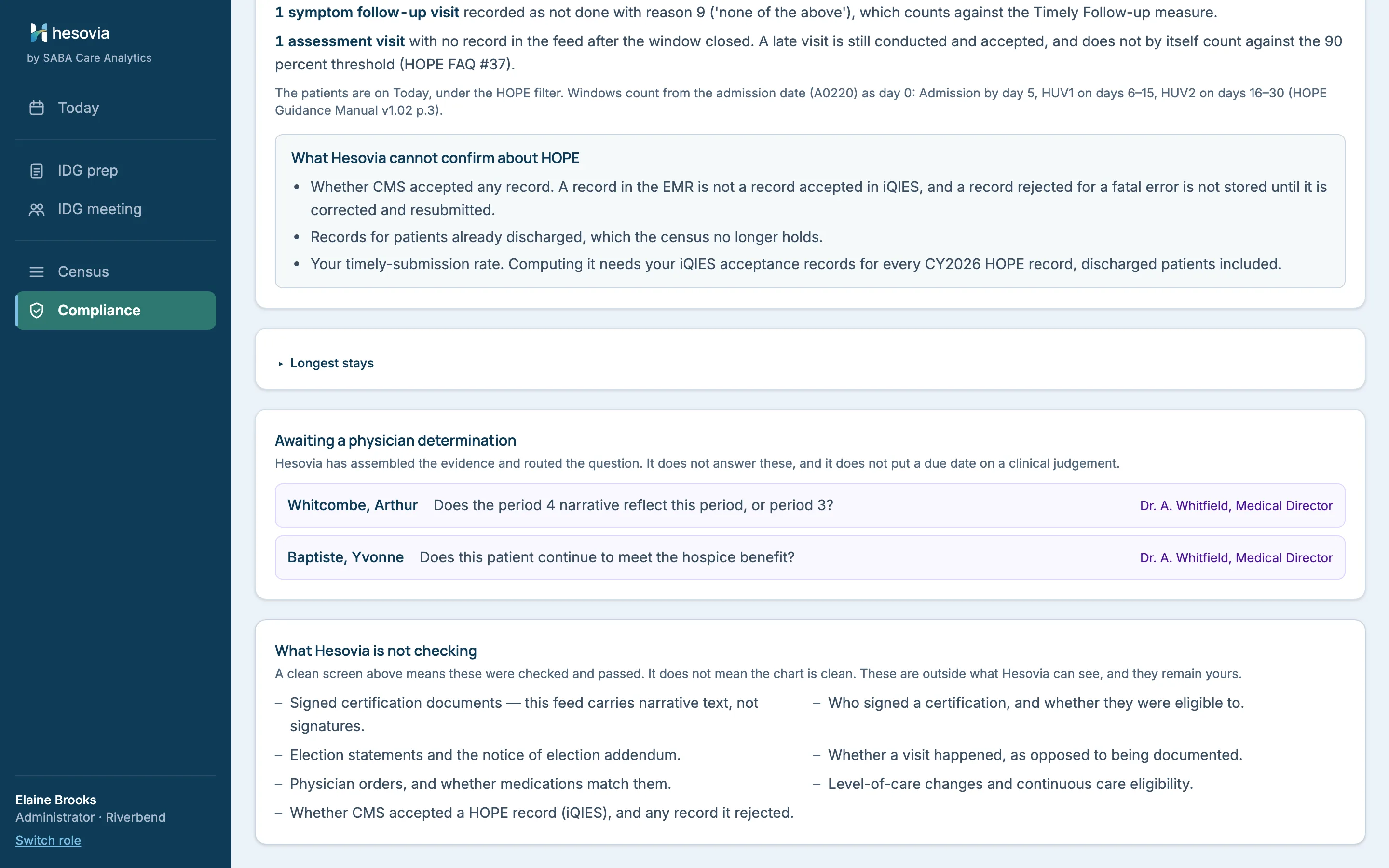
Awaiting a physician determination lists the questions Hesovia has routed to the physician and will not answer, with no due date on a clinical judgement.
HOPE assessments gives counts, never a rate it cannot compute. See HOPE below.
Compliance, two of the headline cards as Elaine Brooks sees them. Illustrative figures computed from invented data: gross period values at the national rate, for sizing only. They are not a claim, remittance or recoupment estimate, and not an estimate of your agency’s results.
Open full size ↗Invented dataWhat Hesovia is not checking, on the dashboard rather than in a footnote.
These are outside what Hesovia can see, and they remain yours.Compliance · What Hesovia is not checking
See it on a call, with the questions your agency would ask.
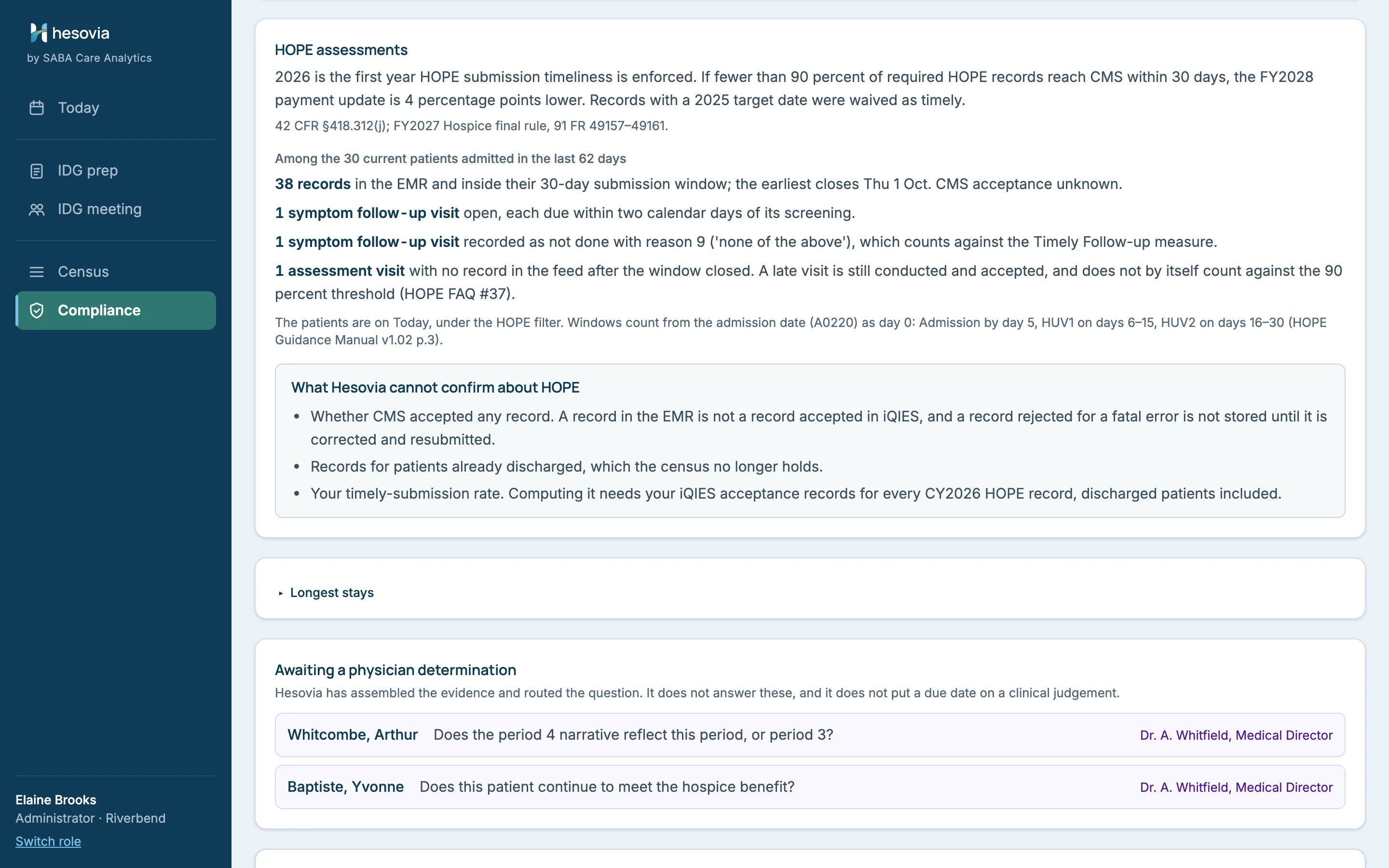
HOPE timeliness counts from 2026. Hesovia keeps the clocks in view.
CMS counts 2026 HOPE submissions toward the FY2028 payment update.
On Today
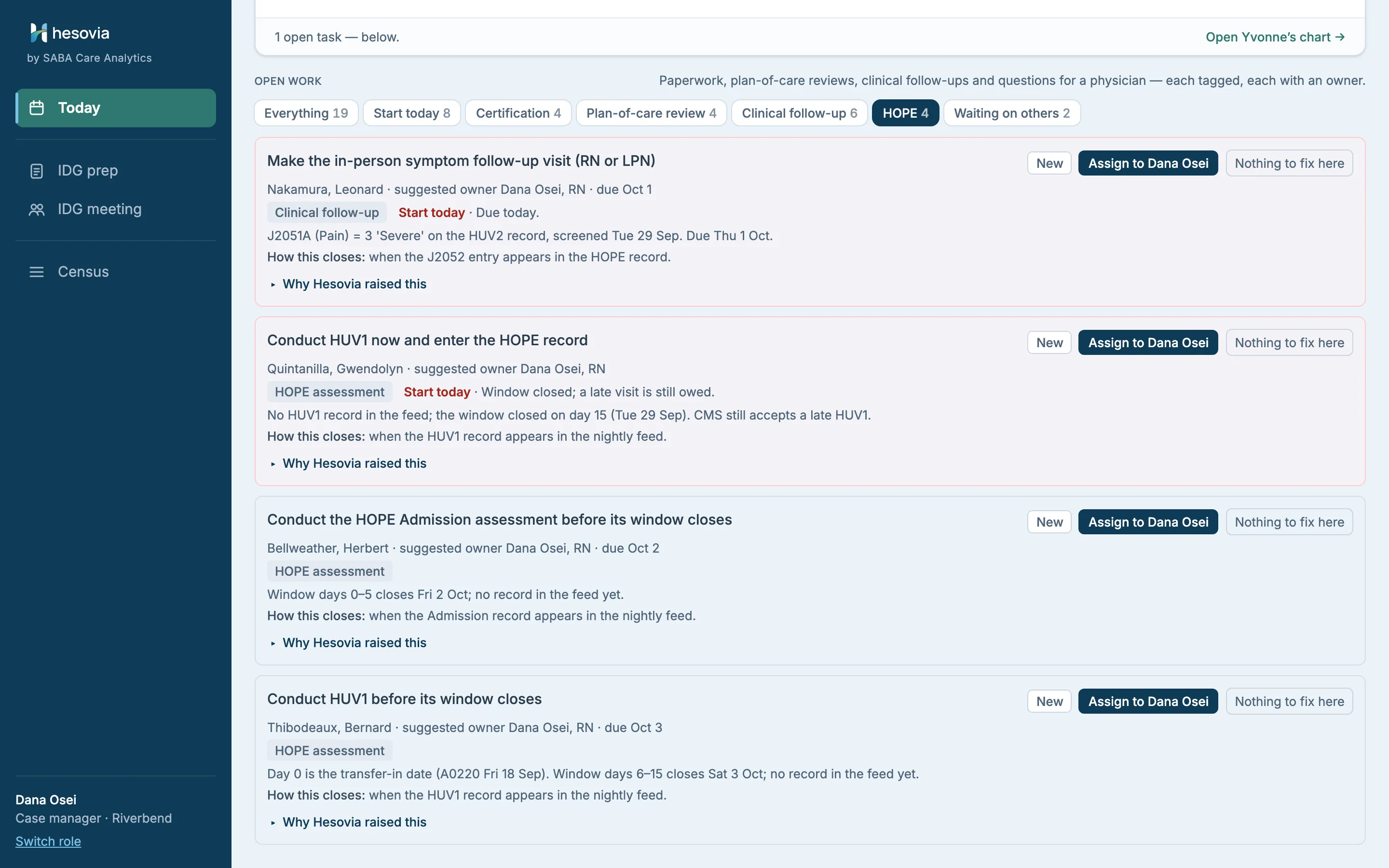
HOPE rows sit in the same worklist, under their own filter: an Admission or HOPE Update Visit (HUV) window about to close, an in-person symptom follow-up visit due within two days of its screening.
In CMS’s words
Rows quote CMS’s own item names and labels and never describe the patient in Hesovia’s words. A transfer-in counts from its transfer date.
Counts, not a rate
The administrator’s card counts records in their window. It gives no on-time rate: that needs CMS’s acceptance records, which the EMR does not hold.
Regulatory references current as of October 2026 (42 CFR §418.312(j); FY2027 Hospice final rule; HOPE Guidance Manual v1.02). Informational, not legal, billing or coding advice.
Open full size ↗Invented dataToday, filtered to HOPE.CMS still accepts a late HUV1. A late HUV is still conducted and submitted.Open full size ↗Invented dataHOPE assessments on Compliance, with What Hesovia cannot confirm about HOPE.
What it will not do
A limits list, on purpose.
Hesovia never states a conclusion a clinician would have to defend. It shows what your team documented, says plainly what it cannot see, and routes clinical determinations to the physician who has to make them.
What Hesovia does not do
Compose a clinical sentence that reaches the medical record. Notes copied for the IDG record go out verbatim, followed by the open-item list and a footer stating Hesovia assembled it.
Decide eligibility. Prognosis is the certifying physician’s determination; Hesovia assembles the evidence both ways and routes the question.
Mark something fixed that it cannot observe. Those items stop at Done, for a person to confirm in the EMR.
Put a due date on a clinical judgement, or answer an eligibility question.
Price a recoupment. Money figures are gross period values at a national rate, tied to no claim.
What the demo is, and is not
A working prototype, built to show how Hesovia would fit a hospice’s week. Not a product you could run on Monday.
Invented data only: patients, clinicians and figures are invented, and the agency name is for illustration only. No real patient information is present anywhere.
No connection to an EMR yet. The demo simulates a nightly EMR export; Hesovia has no integration with, or affiliation with, any EMR vendor. How your notes reach Hesovia is the first thing we work out with each pilot agency.
No write-back. The IDG minutes and the copied notes are handed over as text; the plan of care is still revised in your EMR.
No admission or intake workflow yet. The demo starts from patients already on service.
If write-back, or a check the demo does not make, is what would decide it for your agency, that is the conversation we want to have.
Book a walkthrough
Fifteen minutes, on a hospice week like yours.
Screen-shared, on the invented agency in the demo: no data from you, nothing to install. Then we ask what would decide a pilot for you: whether handing the IDG record over as text works at first, what your EMR already reports, and what a pilot should measure.

 Open full size ↗